Libreswan Documentation

Libreswan's Online Documentation
View the Project on GitHub libreswan/libreswan.github.io
SupportHOWTO
Additional ipsec.conf documentationAWS Mesh
brendans Road Warrior Setup at Home
Configuration examples
Confuse !?@: github wiki
Enterprise cloud encryption
Entropy matters
EoIP shared ethernet LAN using IPsec
High Availability Fallover VPN in AWS
Host to host VPN
Host to host VPN with PSK
Libreswan as client to a Cisco ASA or VPN3000 server
Microsoft Azure configuration
Migrate from IKEv1 DPD to IKEv2 LIVENESS
Opportunistic IPsec
Opportunistic IPsec using LetsEncrypt
Pluto and DNSSEC
Read status output
Route based VPN
SElinux and Labeled IPsec VPN
Subnet extrusion
Subnet to subnet using NAT
Subnet to subnet VPN
Subnet to subnet VPN with PSK
Unauthenticated Opportunistic IPsec
Using Apache to serve PKCS
Using NSS Hardware Tokens
Using NSS with libreswan
VPN server for remote clients using IKEv2
VPN server for remote clients using IKEv2 split VPN
Completed Projects
2026 RFC 9593 Announcing Supported Authentication Methods in IKEv22026 Improve the ACQUIRE to IKE policy lookup
2026 Add HOST TO HOST Support on BSD
2021 RFC 8420 Add EdDSA Signature Authentication Support to IKEv2
2020 Session Resumption
2020 IKEv2 Interop testing with OpenBSD
2020 IKE Intermediate Exchange
2019 Libreswan Opportunistic IPsec using LetsEncrypt
2018 RSA PSS Support in compliance with RFC 7427 and RFC 8247
2018 RFC 7427 Add ECDSA Signature Authentication Support to IKEv2
2018 RFC 5685 Redirect Mechanism
2018 Managing Interface
2017 TCP encapsulation of IKE and IPsec
2017 RFC 7427 Add Signature Authentication Support to IKEv2
2017 Postquantum Preshared Keys
IRC
Hacking
DocumentationGit, GitHub, and Pull Requests
Merging GitHub Pull Requests
Programming Conventions
Testing
DockerKVM
1. Setup The Host2. Configure Testing
3. Compile Libreswan
4. Test Libreswan
5. Accessing The Console
6. Maintenance and Internals
Bisecting
Debugging Pluto
Logging In Using SSH
Performance
Running A Custom Kernel
Running A Single Test
Running In The Background
Setup a Web Server
Testing Old Branches
Updating Test Results
Namespaces
Topology
Internals
3.14 X509Benchmarking and Performance testing
Cipher suites and algorithm support
Cloud OE ideas
Compiling with AddressSanitizer
Compliance of RFC 7427 Signature Authentication in IKEv2
Coverity
Cryptographic Acceleration
Developer links strongswan android
Discouraged or forbidden C functions
IKEv2 Child SA
IKEv2 CP and EAP support
Introduction
Libreswan xfrm kernel support
Logging cleanup
New OE
Pluto
Pluto packet processing
Proposed ipsec ca command
Retransmit timings
Road Map
SAref code
Setting up system for debug logging
stf status
Testing 2017 Next Generation
Unbound
Uncrustify
Use Cases and Requirements document for ECC ECDSA support
Use Cases and Requirements document
XFRM Interface Development Notes
XFRM pCPU
XFRM pCPU RSS
Security
Crypto boundary and certificationLibreswan and Heartbleed
Libreswan and TunnelCrack
Reporting a Vulnerability
Vulnerabilities
Obsolete HOWTOs
IKEv1 XAUTH with FreeOTP and FreeIPAIKEv1 XAUTH with Google Authenticator One Time Passwords
Route based VPN using VTI
Testing Namespace
VPN server for remote clients using IKEv1 with L2TP
VPN server for remote clients using IKEv1 XAUTH with Certificates
VPN server for remote clients using IKEv1 XAUTH with PSK
IKEv1 is obsolete, please migrate to IKEv2
Using XAUTH PSK is the least secure mode of running IKE/IPsec. The reason is that everyone in the “group” has to know the PreShared Key (called PSK or secret). Even if you require further authentication, such as a username and password, someone that knows the PSK can launch a man-in-the-middle attack pretending to be the VPN server, If the client connects to the rogue server, it will tell the attacker their username and password.
On Android, this mode is called PSK XAUTH. On iOS/OSX this mode is confusingly called of type “IPSec”. some other vendors call it “Group PSK”.
It is also possible (and more secure) to use XAUTH with Certificates - seeVPN_server_for_remote_clients_using_IKEv1_XAUTH_with_Certificates
XAUTH PSK
Supported clients:
- All Apple iphones, ipads
- Mac OSX
- Android
- Linux with NetworkManager or commandline
- Microsoft Windows using a third party client such as the Cisco client, or the free Shrew Soft client
It is based on draft-ietf-ipsec-isakmp-xauth-06. XAUTH also requires a username and password. The password can also contain a one time password (OTP) such as Google Authenticator
Server ipsec.conf for XAUTH/PSK
This configuration example uses Main Mode and not Aggressive Mode, as it is more portable and you can use a single conn on the server for Android, iOS/OSX and Linux clients.
# libreswan /etc/ipsec.conf configuration file
config setup
  protostack=netkey
  # exclude networks used on server side by adding %v4:!a.b.c.0/24
  virtual-private=%v4:10.0.0.0/8,%v4:192.168.0.0/16,%v4:172.16.0.0/12,%v4:25.0.0.0/8,%v4:!10.231.247.0/24,%v4:!10.231.246.0/24
  # PSK clients can have the same ID if they send it based on IP address.
  uniqueids=no

conn xauth-psk
    authby=secret
    pfs=no
    auto=add
    rekey=no
    left=%defaultroute
    leftsubnet=0.0.0.0/0
    rightaddresspool=10.231.247.10-10.231.247.254
    right=%any
    # make cisco clients happy
    cisco-unity=yes
    # address of your internal DNS server
    modecfgdns=10.231.247.1
    # versions up to 3.22 used modecfgdns1 and modecfgdns2
    #modecfgdns1=10.231.247.1
    leftxauthserver=yes
    rightxauthclient=yes
    leftmodecfgserver=yes
    rightmodecfgclient=yes
    modecfgpull=yes
    #configure pam via /etc/pam.d/pluto
    xauthby=pam
    # xauthby=alwaysok MUST NOT be used with PSK
    # Can be played with below
    #dpddelay=30
    #dpdtimeout=120
    #dpdaction=clear
    # xauthfail=soft
    ikev2=never
The PSK needs to be stored in /etc/ipsec.secrets (or a separate file such as /etc/ipsec.d/xauth-psk.secrets)
# The first IP is the real IP address of the server
111.222.111.222 %any : PSK "ExampleSecret"
# If this is the only IP and only PSK based configuration, you can configure without hardcoding the IP:
: PSK "ExampleSecret"
In this example, the IP pool is 10.231.247.0/24 so on the VPN server you would need to provide some NAT rules if you wish to offer full internet connectivity through the VPN. Assuming that your office servers behind this VPN server uses 10.231.246.0/24, you would add the following iptables rules on the VPN server:
# Note: you should replace $INTERNET_INTERFACE with your internet facing interface.
# Note: this line handles maquerade for both 10.231.246.0/24 and 10.231.247.0/24

iptables -t nat -A POSTROUTING -s 10.231.246.0/23 -o $INTERNET_INTERFACE -m policy --dir out --pol none -j MASQUERADE
Client ipsec.conf XAUTH/PSK
There are some small differences with the above server configuration
conn xauth-psk
    authby=secret
    left=%defaultroute
    leftxauthclient=yes
    leftmodecfgclient=yes
    leftxauthusername=YOURUSERNAME
    modecfgpull=yes
    right=REMOTESERVERNAME
    rightxauthserver=yes
    rightmodecfgserver=yes
    rekey=no
    #dpdaction=hold
    #dpdtimeout=60
    #dpddelay=30
    auto=add
    # Commonly needed to talk to Cisco server
    # Might also need _exact_ ike= and esp= lines
    # remote-peer-type=cisco
    # aggrmode=yes
    # one of thesse two
    # rightid=@[GroupName]
    # rightid=@GroupName
You need to store the Group PSK into a secrets file (/etc/ipsec.secrets or your own /etc/ipsec.d/xauth-psk.secret). You can also store your XAUTH password in /etc/ipsec.secrets if you do not use NetworkManager and if you’re not using a one time token:
# /etc/ipsec.secrets
REMOTESERVERNAME %any : PSK "YourGroupPSK"
@YOURUSERNAME: XAUTH "YourPassword"
When using PSK instead of RSA/certificates, you require the “GroupPSK” which is the XAUTH secret, and also need to use leftid=@GroupID instead of using the ID of your certificate.
You can bring the connection up using the comnmand: ipsec auto –up xauth-psk This will automatically reconfigure your DNS if required, and configure the given IP address on your system.
Server options
Aggressive Mode
The difference between using the regular Main Mode or Aggressive Mode for the client is usually determined by whether or not the “Group Name” is set. On Android, this option is called “IPSec identifier”. On iOS/OSX and NetworkManager this fiels is called “Group Name”. When these fields are blank, Main Mode (preferred) is used. When these are not blank, Aggressive Mode is used. On the serverside, the Group Name is the value of the rightid=@String (the remote end, not the server end). Unfortunately, iOS/OSX sends these as hex, which can be matched using rightid=@[String] but then it no longer works for Android. With NetworkManager you can specify “String” or “[String]”. These values are best left unset when using libreswan as a server, so that Main Mode is used. When connecting to a Cisco with libreswan as a client, you will need to use rightid=@String and aggrmode=yes.
[!NOTE] iOS UserInterface bug: If you ever fill in the “Group Name” and then clear it - the connection remains using Aggressive Mode. If you want to use Main Mode your only choice is to delete the VPN profile and start one from scratch where you never touch the “Group Name” input box.
User/password authentication for XAUTH on the server
Libreswan has three options for the user/password authentication. This is specified using the xauthby= option. If using X.509 certificates, which are issued to individual devices/users and which can be revoked, there is no real need to have an additional username/password layer. In that case, xauthby=alwaysok can be used. This should not be used when using a PSK.
If there are only a handful of users that need to be authenticated, xauthby=file can be used. The format of this file is similar to the Apache htpasswd file, but the htpasswd command can not be used to create the file. The differences to htpasswd format is pluto uses standard crypt hashing which is same as /etc/shadow format so sha2_512 can be used. Additional third column specifying the connection name. An example of an /etc/ipsec.d/passwd file for the above example connection (using xauthby=file) would be:
john:$1$5h/bAg4p$Q5/c2XjwSzYy3sh/1j8Bp/:xauth-psk
paul:$1$YiVSo114$um2oIM6AqucFuMeXl/1ab0:xauth-psk
The last method that can be used is xauthby=pam. Using this configuration, libreswan uses the /etc/pam.d/pluto pam configuration file to authenticate users. An /etc/pam.d/pluto example file:
#%PAM-1.0
# Regular System auth
auth include system-auth
#
# Google Authenticator with Regular System auth in combined prompt mode
# (OTP is added to the password at the password prompt without separator)
# auth required pam_google_authenticator.so forward_pass
# auth include system-auth use_first_pass
#
# Common
account required pam_nologin.so
account include system-auth
password include system-auth
session optional pam_keyinit.so force revoke
session include system-auth
session required pam_loginuid.so
== xauthfail= option ==
Some deployments wish to catch the user when their password is wrong or disabled and notify them. When the option xauthfail=soft is set, the authentication failure is ignored and the IPsec tunnel is allowed to establish. The “updown” script is signaled with the environment variable XAUTHFAIL=soft. This can be used to NAT this user to a specific web page where they can renew their VPN subscription.
== ike-frag= option ==
It is recommended to use the ike-frag=yes option to make the IKE connection more reliable. This is particularly important when using X.509 certificates, which tend to cause fragmentation when used with 2048 bit RSA keys.
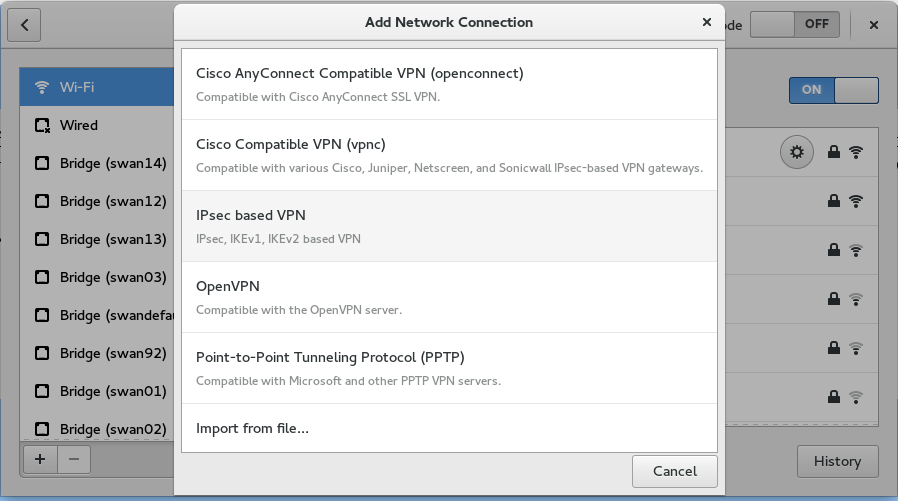
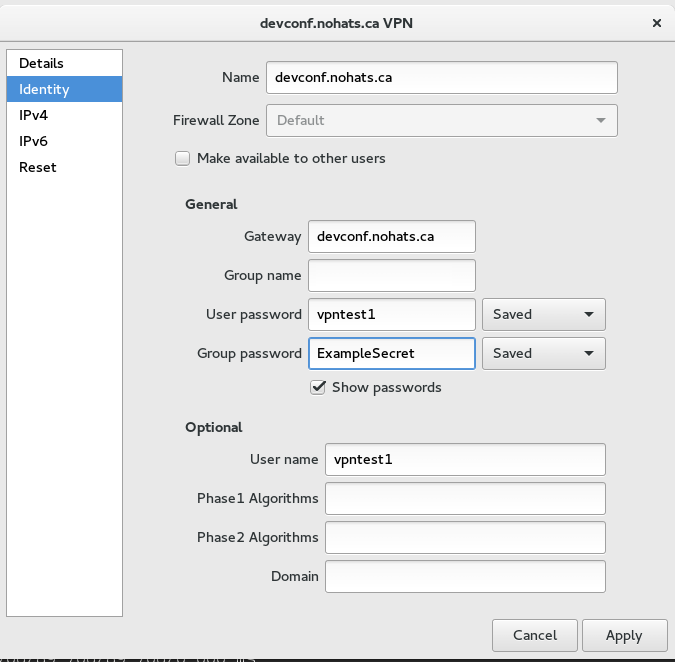
NetworkManager-libreswan client
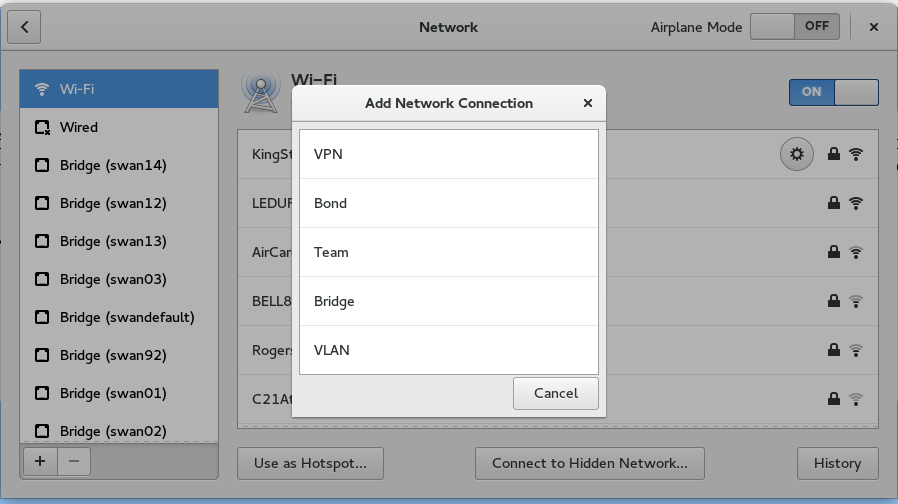
These are some screenshots of the NetworkManager libreswan client to configure XAUTH PSK. Note that until very recently (February 2016), NetworkManager only supported using Aggressive Mode and the Group Name field could not be left empty. If you see this happening, please upgrade your NetworkManager-libreswan (or NetworkManager-openswan) plugin.

iPhone and iPad client
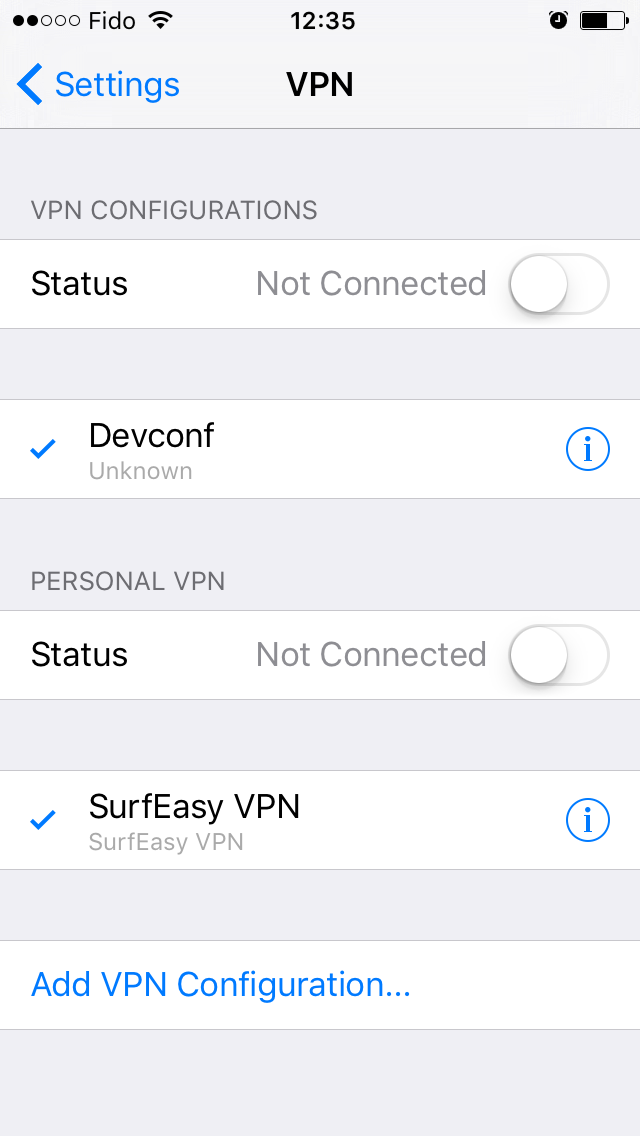
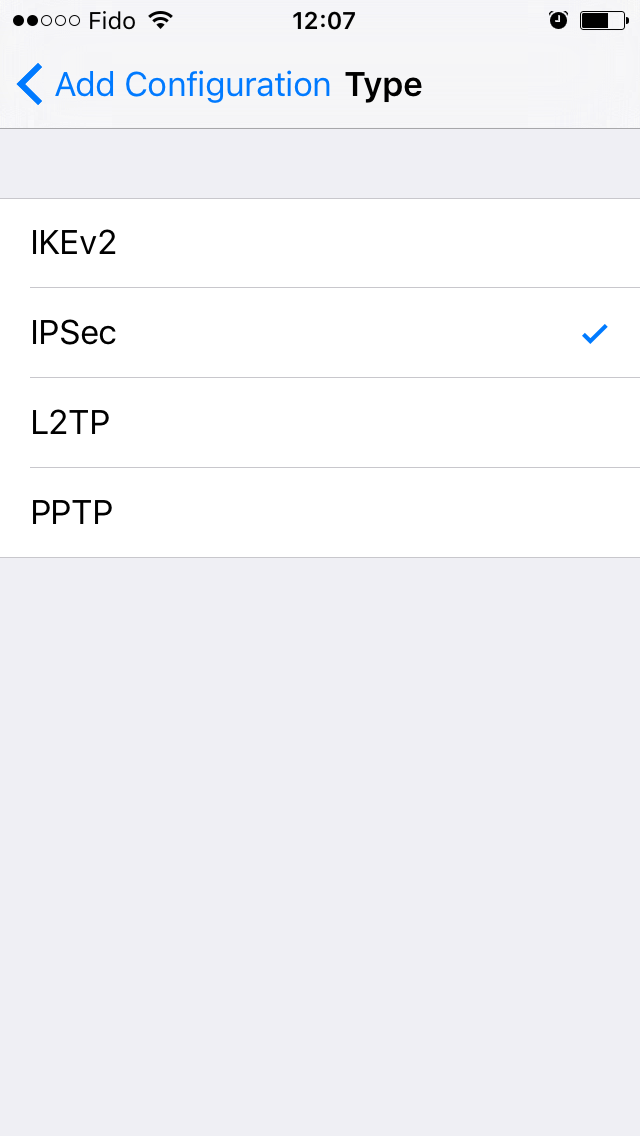
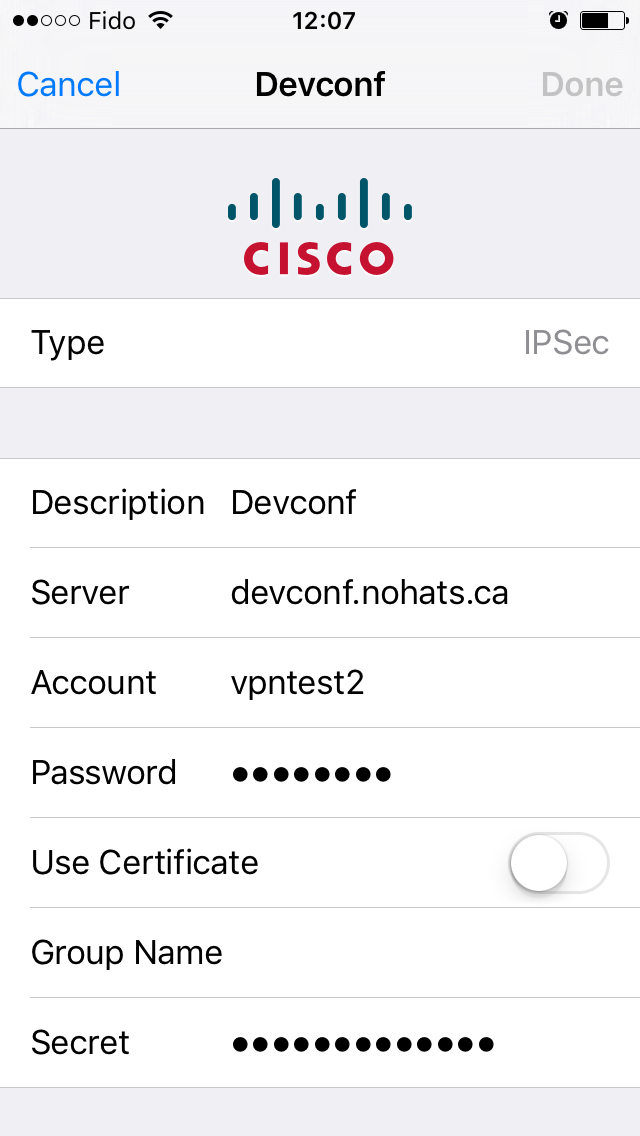
Go to Settings and select VPN. Click on Add VPN Configuration. select type IPSec. Fill in the description, server (name or IP), Account (aka username), Password and Secret (aka PSK). For PSK connection you MUST NOT enter a Group Name.